
MAVIA by Yloria
From signed contract
to project delivery.
MAVIA helps you understand your contract, organise tasks and follow your team’s work.

The project workflow
Understand your contract.
Organise the work.
You receive a contract and the documents describing the client’s expectations. What needs to be done? Which documents must you deliver? By when? MAVIA helps you prepare the work from this information.
Understand what the contract requires
AI identifies tasks, items to deliver to the client, dates and amounts in your documents. The project director can read the corresponding contract text to check this information before approving it.
Prepare a document the client needs
For example, the contract calls for a quality assurance plan. In Deliverables, find what the contract requires and open a first draft prepared from the project documents. Compare it with the contract, then download it to complete or correct it.
Organise tasks and share the work
The schedule shows tasks on a calendar: what needs to be done, in which order and who is responsible. The project director checks which tasks must finish before others can start. Everyone can see what to prepare and who takes over next.
Have the people responsible review the schedule
Each task lead checks the proposed dates and time needed for their tasks. They approve them or request a change. The relevant managers review disagreements, up to the project lead when needed. If the schedule changes, those affected can be asked to check it again.
Once the approvals are in, the project lead approves the reference schedule, called T0 in MAVIA. It can then be compared with actual progress. If the operations director is responsible for the project, they complete this approval.
Follow completed work and what remains
Each task lead records the time spent and estimates the work still needed. The project director follows possible delays and approval of the documents to deliver to the client. Production management has a view across all its projects.
An example · Anticipating a delay
A task is running late.
Can testing with the client start on Monday?
On Friday, the internal test lead reports that some checks are unfinished. Testing with the client is due to start on Monday, but only after those checks are complete. Does the date need to change?
In MAVIA, the project director compares the new estimated date with the approved schedule. They identify the task causing the delay and the person responsible.
Together they can assign another person to finish the work or propose a new date to the client. The forecast helps them decide without changing the approved reference schedule.
From time spent to project progress
How much workload
remains to be completed?
The test lead records the time already spent on a task and estimates the work still needed. Their manager checks the figures, then approves them or asks for a correction. Until approval, MAVIA continues to show the last approved figures.
Project directors see which tasks need more work than planned. Production management follows these estimates across all projects and sees which teams have yet to record their time.
- Work in the approved schedule
- 10 days
- Work completed
- 6 days
- Approved work still needed
- 7 days
- Estimated total work
- 13 days
The estimate rises from 10 to 13 days of work. This does not necessarily mean three days of delay: the date depends on the people available and the tasks that follow.
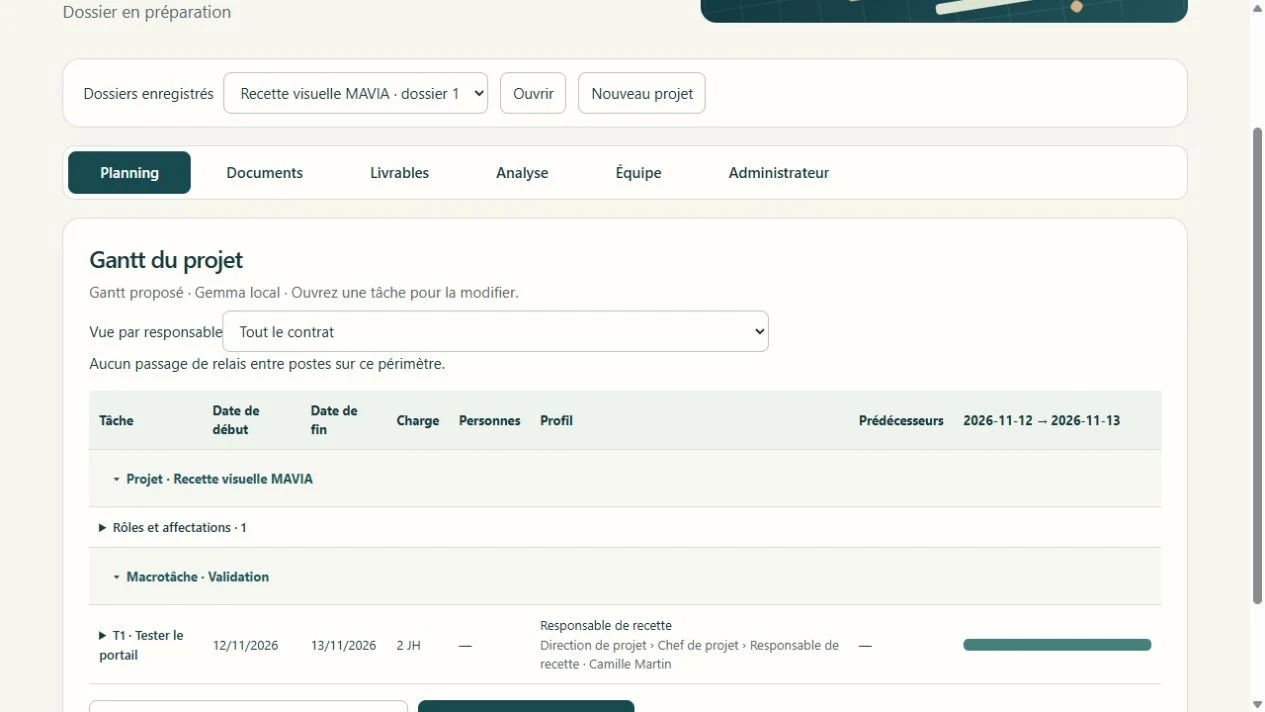
Inside the platform
See who does what.
And in which order.
Open a task in the schedule to see the work planned, the type of person needed and which tasks must finish before it can start.
Explore the demo ↗MAVIA pricing
€15 per user per month
excluding tax.
With 20% French VAT, the price is €18 per user per month including tax. For your first invoice, you state how many people will use MAVIA. At the end of each subscription month, MAVIA counts users whose accounts are enabled on that date, even if they have not signed in. Pending invitations, people without access and disabled accounts are excluded.
Each user counted on that date is charged for the whole month. If this differs from the number already billed, the next invoice shows the extra amount due or the amount deducted. This new headcount is also used for the following month.
All teams have access to the guided tour and documentation. With at least 10 subscribed users, your company also receives two remote sessions in the first 30 days: 45 minutes to start the first project, then 30 minutes to review the schedule and how the work is shared.
Email support is included during your subscription. Importing existing data, extra training and help managing your contracts require a separate quote. The offer explains what is included and the terms for using AI.
Each month, your company receives a shared allowance of credits for AI analyses. The number of included credits depends on paid users. Unused credits expire at the end of the monthly period. If you need more, you can purchase a top-up after accepting a quote. Review the offer and terms before paying. For 100 or more users, request a quote.